
What Is Agent Tracing
Agent tracing is the run-level record of how an agent reasoned, which tools it used, and where the workflow succeeded or failed.
This guide explains what agent tracing means in practical workflow systems and why it matters for debugging, evaluation, and governance. It focuses on observable execution rather than hidden reasoning claims.
Related Tools



Details
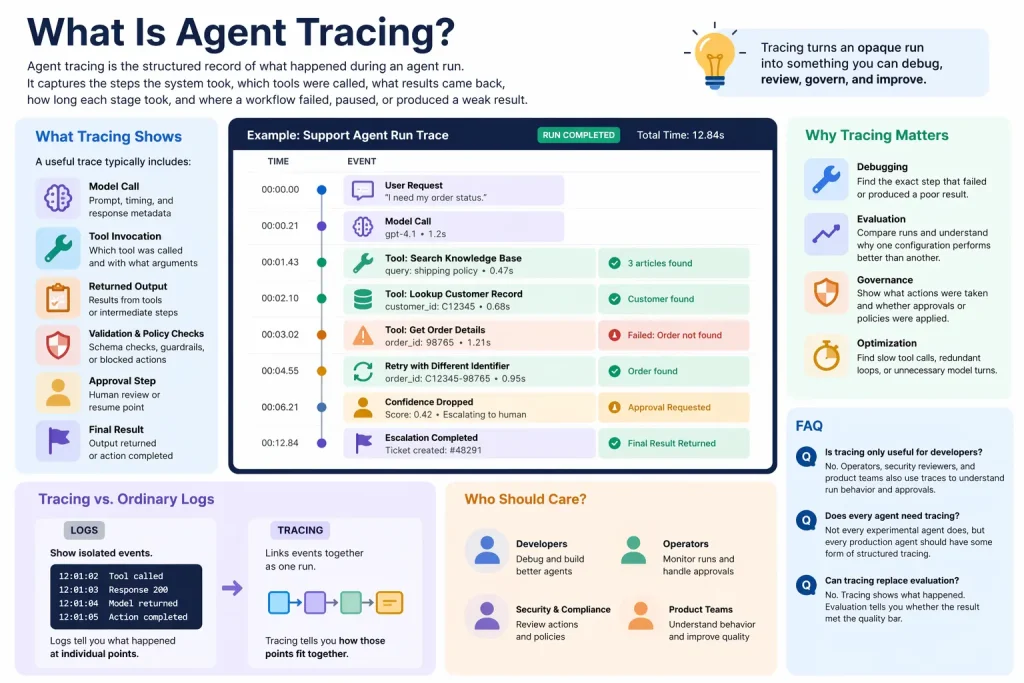
Agent tracing is the structured record of what happened during an agent run. It captures the steps the system took, which tools were called, what results came back, how long each stage took, and where a workflow failed, paused, or produced a weak result.
Tracing matters because agents are multi-step systems. Once a run includes tools, approvals, retries, handoffs, or multiple turns, you need more than a final answer. You need a way to see the path that produced it.
What tracing shows
A useful trace typically includes events such as model calls, tool invocations, returned outputs, validation results, interruptions, approvals, and final outcomes. In many systems, these events are grouped into traces and spans so you can inspect the run as a hierarchy rather than as one long log stream.
For example, a support agent trace might show a user request, a search against a knowledge base, a customer-record lookup, a failed attempt to retrieve an order, a retry with a different identifier, and then an escalation step when confidence drops.
Why tracing is important
- Debugging: identify the exact step that failed or produced a poor result.
- Evaluation: compare runs and understand why one configuration performs better than another.
- Governance: show what actions were taken and whether approvals or policies were applied.
- Optimization: find slow tool calls, redundant loops, or unnecessary model turns.
How tracing differs from ordinary logs
Ordinary logs often show isolated events. Tracing links those events together as part of one run. That makes it easier to answer questions such as: Which tool call caused the bad final output? Where did latency increase? Did the agent loop too many times before stopping?
In other words, logs tell you what happened at individual points. Tracing tells you how those points fit together.
Who should care about agent tracing
Anyone running agents in production should care about tracing. It becomes especially important when workflows involve external tools, internal approvals, customer-facing actions, or multiple agents coordinating through handoffs.
If an agent is only used for one-off internal experiments, light logging may be enough. If it affects records, customers, or team operations, traces become essential.
What usually appears in a trace
| Trace element | What it shows |
|---|---|
| Model call | Prompt, timing, and model response metadata |
| Tool span | Which tool was called and with what arguments |
| Validation event | Schema checks, policy checks, or blocked actions |
| Approval step | Where a human reviewed or resumed the run |
| Final result | The output returned or action completed |
How tracing helps workflow builders
Tracing is especially useful for workflow builders because many failures are not model failures in isolation. They are orchestration failures: wrong field mappings, weak tool descriptions, missing permissions, or bad routing after a tool returns incomplete data.
A trace makes those problems visible. That is why tracing pairs naturally with evaluation and guardrails. Guardrails stop unsafe behavior; traces explain what happened; evals tell you whether the behavior was actually good enough.
When templates help
Templates can help you build the surrounding workflow for review queues, Slack alerts, retry handling, or saving run metadata. They are less helpful for the trace model itself, which depends on how your agent framework represents calls, spans, and state. Still, a template can speed up the operational layer around tracing.
Common misunderstandings
- Tracing is not the same as storing every hidden chain-of-thought detail.
- Tracing is not only for failures; it is also for performance tuning and compliance evidence.
- Tracing is not optional once agents can perform multi-step actions in business systems.
FAQ
Is tracing only useful for developers?
No. Operators, security reviewers, and product teams also use traces to understand run behavior and approvals.
Does every agent need tracing?
Not every experimental agent does, but every production agent should have some form of structured tracing.
Can tracing replace evaluation?
No. Tracing shows what happened. Evaluation tells you whether the result met the quality bar.
Conclusion
Agent tracing is how you make multi-step AI behavior observable. It turns an opaque run into something you can debug, review, govern, and improve over time.
Related Guides

How AI Agents Work
This guide breaks down how AI agents work at an operational level so you can understand the model, tool, state, and orchestration loop behind...
Read Guide
Core Components of an AI Agent
This guide explains the core components of an AI agent and why each one matters in real implementations. It focuses on architecture choices that...
Read Guide
How to Build Agentic Workflows with Responses API
This tutorial explains how to build agentic workflows with the Responses API, including tool design, state decisions, approvals, and validation. It is aimed at...
Read Guide
What Are Agent Guardrails
This guide explains what agent guardrails are, how they work in practice, and why they matter once an agent can call tools or take...
Read Guide