
What Is AI Automation? A Practical Definition for Workflow Teams
A clear explanation of AI automation, what it means in practice, and where it fits inside modern workflows.
This guide explains what AI automation actually means for workflow teams, not just in theory but in day-to-day operations. It covers how AI automation differs from traditional workflow automation, where it adds value, and where it still needs human review or deterministic logic.
Related Tools




Details
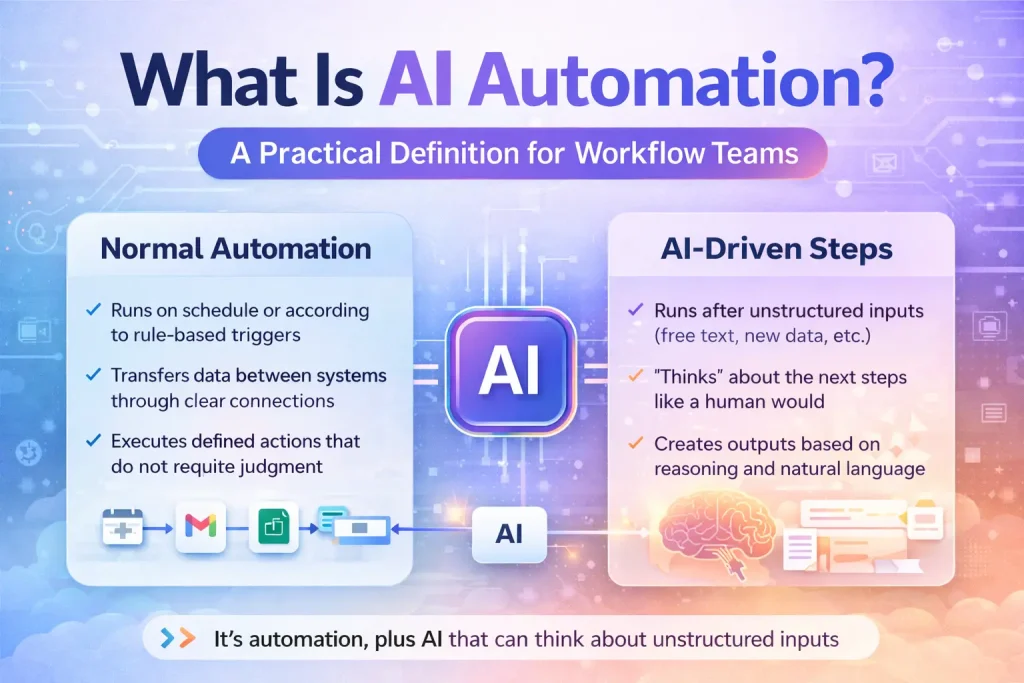
AI automation is the use of AI inside a workflow so that a system can handle tasks that are not purely rule-based. In practice, that usually means combining normal automation steps such as triggers, routing, record updates, and notifications with AI tasks such as classification, summarization, extraction, drafting, or decision support.
The easiest way to understand AI automation is to compare it with standard automation. Standard automation works best when the logic is explicit: if a form is submitted, create a CRM record; if a payment fails, send an alert. AI automation becomes useful when the workflow has to interpret messy inputs, such as emails, call transcripts, support tickets, PDFs, or open-text requests.
What AI automation does in practice
AI automation does not usually replace the whole workflow. Instead, it improves one or more steps inside the workflow. For example, a system may detect the intent of an inbound email, summarize a meeting transcript, extract fields from a document, draft a reply, or suggest a priority level for a new lead. After that AI step finishes, the rest of the workflow still depends on predictable automation logic.
A simple way to think about the stack
| Layer | Role | Example |
|---|---|---|
| Trigger | Starts the workflow | New form, new email, new ticket |
| Deterministic automation | Handles fixed logic | Routing, status update, notifications |
| AI step | Handles interpretation | Summarization, extraction, classification |
| Human review | Checks risky outputs | Approval before sending or updating |
| Destination | Stores or acts on result | CRM, spreadsheet, ticket system, doc tool |
How AI automation is different from traditional automation
Traditional automation depends on predefined rules. It is strong when your process has clear conditions and consistent inputs. AI automation adds a layer that can interpret language, documents, and ambiguous data. That makes it useful for workflows involving customer messages, content, internal knowledge, or mixed-format files.
The tradeoff is reliability. A rule-based step either matches or does not. An AI step may produce a helpful answer, an incomplete answer, or the wrong answer in a format your next step cannot use. That is why good AI automation design usually combines AI with structured outputs, validation steps, and human review for higher-risk actions.
How AI automation is different from AI agents
AI automation and AI agents overlap, but they are not the same. AI automation usually lives inside a defined workflow with known triggers, systems, and outputs. AI agents are often framed as more open-ended systems that can choose tools, plan multi-step actions, or reason across broader tasks. In real operations, many so-called agents are still just AI automation workflows with a planning layer added on top.
If your process is narrow and repeatable, you probably need AI automation, not a full agent system. Teams often overcomplicate the problem by reaching for an agent when a structured workflow with one AI step would be easier to control and maintain.
Common use cases for AI automation
- Classifying and routing support tickets.
- Summarizing sales or customer calls.
- Extracting structured fields from PDFs or uploaded forms.
- Generating content briefs, first drafts, or internal summaries.
- Enriching CRM records and standardizing messy text fields.
- Answering internal questions using approved knowledge sources.
Who should care about AI automation
Operations teams, support leaders, sales ops, marketing ops, internal tooling teams, and technical builders should care when they already run repetitive workflows that involve unstructured input. If your work mostly consists of moving structured records between systems, standard automation may already be enough. If your work depends on reading, interpreting, summarizing, or drafting, AI automation becomes more relevant.
When AI automation is useful
AI automation is useful when interpretation is the bottleneck. For example, if a support team can already route tickets but wastes time reading long customer messages, AI can help by labeling and summarizing before the routing logic runs. If a finance team already has an approval process but receives messy invoice files, AI can help extract the fields before the approval chain begins.
When AI automation is unnecessary or overkill
It is unnecessary when the process is already fully structured and reliable without it. If a form uses fixed fields and the output is a straightforward record update, adding AI may only introduce cost and failure points. It is also overkill when the underlying process is unclear. AI will not fix missing ownership, inconsistent policy, or bad data architecture.
Common misconceptions
AI automation means full autonomy
It usually does not. Most production-grade AI automation still includes controlled inputs, validation, and some form of review for important actions.
AI automation removes the need for workflow design
No. Workflow design becomes even more important because the AI output has to fit cleanly into downstream systems.
Any workflow can be improved by adding AI
Not true. Some workflows only need better process design or better integrations, not model-based interpretation.
When a template helps
A template is useful when you already know the workflow pattern, such as support ticket triage, content brief generation, CRM enrichment, or meeting note processing. Templates can save time on triggers, connections, and common routing logic. They do not remove the need to tune prompts, map fields, and decide where human approval belongs.
FAQ
What is AI automation in simple terms?
It is automation that uses AI for tasks like interpreting text, summarizing content, extracting information, or drafting outputs inside a workflow.
Is AI automation the same as workflow automation?
No. Workflow automation can be entirely rule-based. AI automation adds model-based steps where interpretation is needed.
Do I need AI agents for AI automation?
No. Many useful AI automation workflows only need one or two AI steps inside a normal workflow builder.
Which tools are commonly used for AI automation?
Teams often use workflow platforms such as n8n, Make, Relay.app, Gumloop, or Workato, combined with model providers and business apps.
Bottom line
AI automation is best understood as workflow automation plus AI-powered interpretation. It matters when your process includes language, documents, or ambiguity that normal rules cannot handle well. It matters less when your workflow is already structured and predictable. The practical goal is not to make everything autonomous, but to place AI where it reduces friction without weakening control.
Related Guides
What Is MCP for AI Workflows?
This guide explains MCP for AI workflows in practical terms, including how it changes tool access, where it fits, and what it does not...
Read Guide
What Is the n8n MCP Server?
This guide explains the n8n MCP server in practical terms, including how it works, what it is for, and where it fits in an...
Read Guide
What Is Microsoft Agent Framework?
This guide explains what Microsoft Agent Framework is, why it matters, and how it differs from automation tools and other agent frameworks.
Read Guide