
How to Build an n8n AI Social Media Workflow for Multi-Platform Publishing
A step-by-step guide to generating, reviewing, and publishing multi-platform social content with n8n and AI tools.
This guide explains how to build an n8n workflow that generates social posts, sends them for review, and publishes approved content across multiple platforms. It is best for teams that want one workflow for content production and distribution rather than a separate process for each channel.
Related Tools




Details
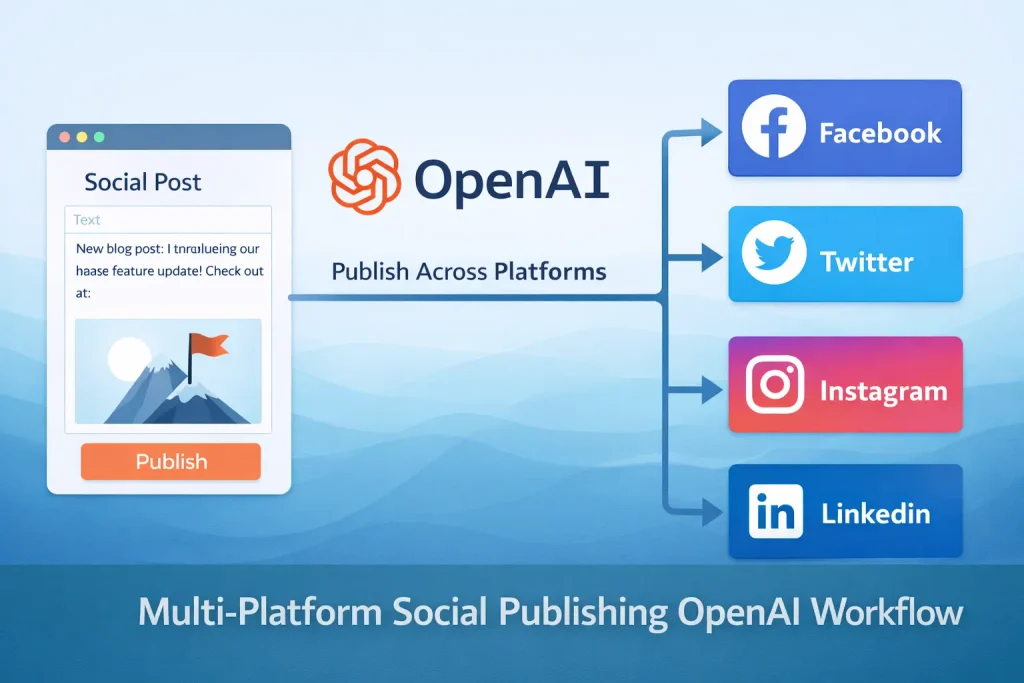
An n8n AI social media workflow can centralize content generation, review, and publishing in one place. The version covered here is not a minimal posting bot. It is a broader content factory pattern: collect the post brief, generate platform-specific copy and images, send the content for approval, and only then publish to selected channels.
This kind of workflow makes sense when your team is posting across several networks and wants one structured process instead of repeated manual editing. It is less suitable if you only publish to one channel or if your brand voice is so tightly controlled that each post still requires full manual writing. In those cases, the approval stage may still be useful, but the generation layer may not save much time.
What you will build
You will build an n8n workflow that accepts a social content brief, uses AI models to generate platform-aware text, optionally creates an image, sends formatted content for review by email, and publishes approved assets to multiple platforms. The source workflow includes channels such as Instagram, X, Facebook, and LinkedIn, plus optional notification outputs.
What you need before you start
- n8n with credentials for the AI model providers you plan to use. The source workflow uses OpenAI, Google Gemini, and SERP-based research.
- Credentials for each publishing destination you actually want to enable.
- A clear input format for the content brief. This can be an n8n form, internal request form, or structured data source.
- A human review owner. Multi-platform content workflows break down quickly when approval responsibility is vague.
Workflow structure at a glance
The source template is arranged in stages. First it collects input and generates written content. Then it can create or select an image. Next it formats a review message and sends it for approval. Finally, if the content is approved, it publishes to the chosen channels and sends a result summary. That staged structure matters. It keeps the workflow understandable even though it contains many nodes.
Step-by-step setup process
- Define the content brief. At minimum include the topic, target audience, key message, channel list, and any brand constraints such as banned phrases or required call-to-action style.
- Build the writing stage. Use an LLM node or agent block to generate separate post variants for each platform instead of one generic paragraph reused everywhere. Platform-specific prompts are more reliable than heavy post-processing later.
- If image generation is part of the workflow, create that as a separate stage. Keep the image prompt output structured so the review step can show both the text and the visual direction.
- Format a review email or approval form. Include all channel variants in one message if the reviewer needs cross-platform consistency, or split them if different people approve different channels.
- Add an approval check. The source workflow uses Gmail and form-based interaction for the approval path. However you implement it, make the approval output explicit so the publishing stage only runs on a true result.
- Enable only the publishing nodes you need. Do not connect every social platform just because the template supports them. Multi-platform maintenance grows quickly.
- After publishing, send a result summary or log the output somewhere searchable so the team can confirm what actually went live.
How to test or validate the workflow
Test the workflow in layers. First verify the writing output with one content brief. Then test the approval message without publishing anything. Then enable one destination channel and confirm a post can be published successfully. Only after those checks should you activate multiple channels. Large social workflows are easiest to debug when each stage is validated separately.
Common problems and fixes
- Generic output across all platforms: This usually means the prompts are too broad. Write separate instructions for LinkedIn, Instagram, X, and other channels.
- Approval emails are hard to review: Format the content clearly and avoid sending raw JSON or long agent traces to the reviewer.
- Credential sprawl: A multi-platform workflow can become brittle if several tokens expire at different times. Document ownership for each platform connection.
- Publishing succeeds on some channels but not others: Treat each channel as its own deployment surface. Do not assume one passing test means the whole workflow is stable.
- Image generation delays: Put waits, retries, or fallbacks around image steps if the model or storage endpoint is slow.
When to use a template instead of building from scratch
A prebuilt template helps here because the sequence is difficult to design from memory. Generation, image handling, approvals, branching, publishing, and reporting all need to happen in a sensible order. Importing a template gives you that backbone. You still need to rewrite prompts, remove channels you do not need, reconnect credentials, and adjust approval behavior for your team.
If your brand process includes legal review, asset management approvals, or per-region publishing logic, the template will only be the starting point. That is normal. The main value is the structure, not the exact copy it produces on day one.
Best practices
- Separate generation from publishing so reviewers can stop weak content before it reaches social accounts.
- Keep prompts versioned somewhere outside the node description if they are business-critical.
- Add platform-specific limits, especially for shorter channels where the caption length matters.
- Log publication results in a spreadsheet or database if several team members rely on the workflow.
FAQ
Do I need every AI tool shown in the template?
No. Many large templates include alternatives. Start with one writing model and only add more providers if they solve a clear problem.
Should I auto-publish without approval?
Only if the content is low-risk and tightly scoped. For most branded social content, a review stage is worth keeping.
Can I use this workflow for just one platform?
Yes. You can strip the workflow down and keep the generation plus approval pattern for a single channel.
Final implementation notes
The real advantage of this workflow is process consistency. It gives teams one path from content brief to published post. That matters more than the novelty of AI generation. If your prompts are specific and your approval stage is reliable, n8n can act as the operating layer for repeatable multi-platform publishing.
Related Templates

Multi-Platform Social Publishing OpenAI Workflow Template
Generate social posts for multiple networks, route them through approval, and publish the approved content from one n8n workflow.
View TemplateRelated Guides
How to Build a Self-Hosted Research Agent
This guide walks through how to build a self-hosted research agent, including the workflow layers you need, the setup order that works best, and...
Read Guide
How to Use MCP for CRM Automation
This guide explains how to use MCP for CRM automation in a way that is useful but still operationally safe. It focuses on bounded...
Read Guide
How to Use MCP for Internal Knowledge Search
This guide explains how to use MCP for internal knowledge search across documents, work data, and operational documentation. It focuses on retrieval design, permission...
Read Guide