
How to Build a Self-Hosted Research Agent
A practical tutorial for building a self-hosted research agent that produces structured outputs instead of vague autonomous behavior.
This guide walks through how to build a self-hosted research agent, including the workflow layers you need, the setup order that works best, and the failure points to expect.
Related Tools


Details
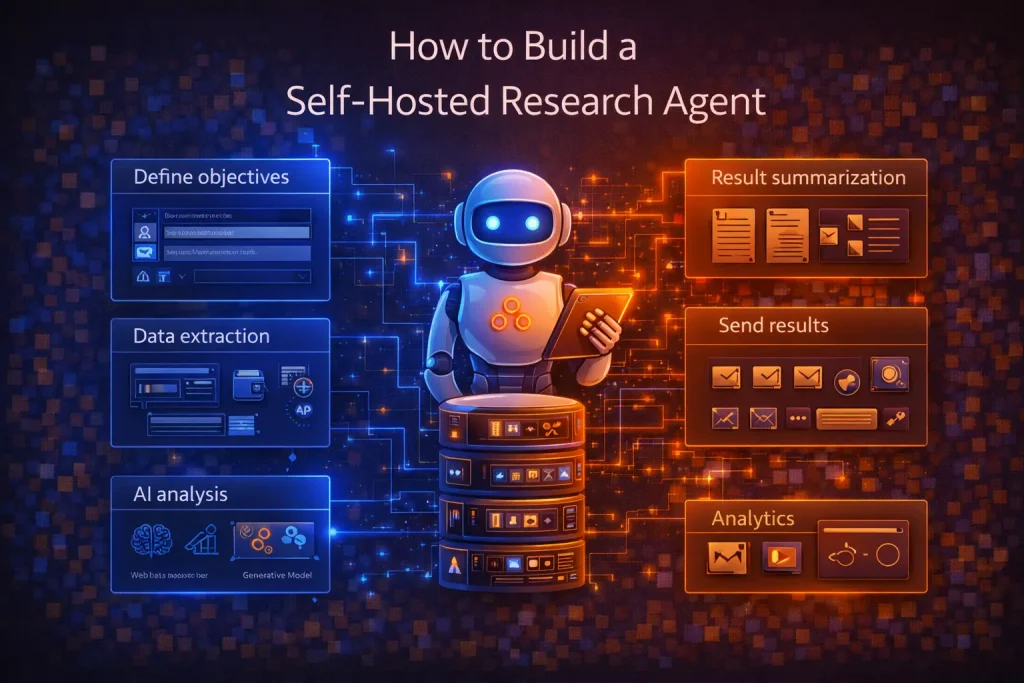
A self-hosted research agent is usually a bounded system that collects sources, filters or structures them, generates a summary, and delivers the result somewhere useful. The most practical way to build one is to start with a narrow research job, not a general-purpose autonomous researcher.
The goal is not to create infinite autonomy. It is to build a repeatable research workflow you can run on your own infrastructure, inspect, and improve over time.
What you will build
In this guide, you will build a self-hosted research agent pattern with a workflow layer, a retrieval or source layer, a model step, and a delivery step. The output could be a structured report in email, Slack, a document, or a database record.
When to use this workflow
Use this pattern when research must run on a schedule, be triggered by a request, or combine multiple sources into a stable output. Do not use it when the task is too open-ended to define sources, output structure, or success criteria.
What you need before you start
- A self-hosted workflow or orchestration layer such as n8n or a code-first framework
- Access to the sources you want to query, such as internal documents, APIs, websites, or databases
- A model provider or self-hosted model setup
- A clear output format such as summary sections, fields, or scored records
- A place to deliver the result, such as email, Slack, docs, or a database
Step-by-step setup process
Step 1: Define one narrow research outcome
Pick one repeatable task such as summarize competitor changes, prepare an account brief, or extract facts from internal documents. The narrower the outcome, the easier the validation.
Step 2: Choose your source set
Decide exactly where the agent can look. For example, a research flow may use a document folder, a database, a few APIs, or a curated web source list. If the source set is vague, the output quality will stay vague too.
Step 3: Build the retrieval and collection layer
Create the step that fetches the source material. This could mean pulling records from a database, reading documents, scraping a controlled set of pages, or querying an internal knowledge base.
Step 4: Normalize the inputs
Convert the source material into a consistent format before it reaches the model. This is where many research agents fail. Mixed fields, broken metadata, and inconsistent text structure make the summarization step weaker.
Step 5: Add the model step
Use the model to summarize, compare, classify, or extract. Ask for a structured output rather than free-form text whenever possible. For example, request sections such as findings, evidence, confidence, and follow-up actions.
Step 6: Add validation and fallbacks
Check for empty results, malformed outputs, duplicate findings, or missing required fields. If the workflow fails here, route it to a human review step instead of forcing a weak output through the system.
Step 7: Deliver the result
Send the output where it will be used: Slack, email, a document, a database row, or an internal dashboard. Delivery should be part of the workflow design, not an afterthought.
How to test or validate the workflow
- Run the workflow on one sample request first
- Confirm the source set is actually being queried
- Inspect whether the output format is stable across multiple runs
- Check whether citations, source identifiers, or evidence fields are preserved where needed
- Compare the result against a human-produced baseline for at least a few examples
Common problems and fixes
- Authentication failures: verify tokens, source permissions, and internal access paths.
- Weak retrieval: narrow the source set and improve metadata before changing prompts.
- Messy model outputs: require structured output and validate required fields.
- Duplicate or stale findings: track record IDs, timestamps, and deduplication logic in the workflow.
- Overly broad research prompts: reduce the goal to one decision, one report type, or one source category.
When to use a template instead of building from scratch
Use a template when your research flow matches a common pattern such as source collection, summarization, and delivery. Templates speed up the skeleton. Build from scratch when the workflow depends on unusual source access, internal policies, or custom evaluation logic.
Final implementation notes
A good self-hosted research agent is less about agent theatrics and more about controlled research operations. Keep the source set narrow, structure the output early, and validate each layer before adding more autonomy.
FAQ
Do I need a full agent framework for this?
Not always. Many research agents work well as workflows with retrieval, model, and delivery steps.
Should I self-host the model too?
Only if privacy, latency, or economics justify it. Many teams get better early results by self-hosting the workflow layer and keeping the model layer managed.
What is the best first use case?
Start with recurring research that already happens manually, such as account briefs, document summaries, or weekly source monitoring.
Conclusion
Build a self-hosted research agent by narrowing the task, controlling the sources, structuring the output, and testing each stage separately. Reliability matters more than sounding agentic.
Related Guides
How to Use MCP for CRM Automation
This guide explains how to use MCP for CRM automation in a way that is useful but still operationally safe. It focuses on bounded...
Read Guide
How to Use MCP for Internal Knowledge Search
This guide explains how to use MCP for internal knowledge search across documents, work data, and operational documentation. It focuses on retrieval design, permission...
Read Guide
How to Use MCP for Internal Ops Automation
This guide shows how to use MCP for internal ops automation without turning internal systems into a broad agent surface. It focuses on narrow...
Read Guide