
Gumloop Pricing in 2026: Plans, Credits, and Cost
A practical breakdown of Gumloop pricing, with a focus on credits, concurrency, and what the platform really costs in production.
This guide explains Gumloop pricing in 2026, including plans, credits, concurrency, and where real workflow cost shows up after testing ends. It is written for teams evaluating Gumloop as an AI workflow platform, not just another automation tool.
Related Tools



Details
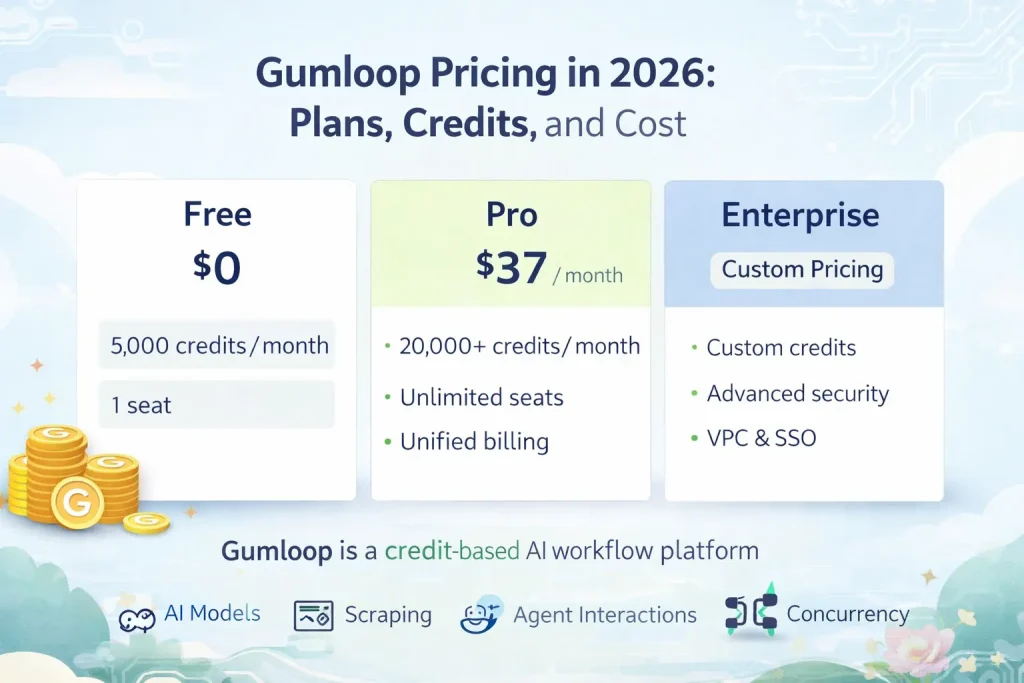
Gumloop pricing is easy to understand at the plan level and harder to forecast at the workflow level. The headline is simple: Free for testing, Pro for serious use, and Enterprise for larger teams with governance needs. The real issue is credits. Gumloop is a credit-based AI workflow platform, so the actual cost depends on what your agents and flows do, not just how many workflows you build.
That makes Gumloop different from classic automation tools. You are not paying only for app actions or workflow runs. You are also buying into an AI-native system where models, scraping, agent interactions, and concurrency are part of the product design. That can be very convenient, but it also means you need to budget around usage patterns, not just subscription tiers.
What Gumloop pricing looks like in 2026
Gumloop’s pricing page currently shows a Free plan with 5,000 credits per month, 1 seat, 1 active trigger, 2 concurrent runs, and 5 concurrent agent interactions. Pro starts at $37 per month and includes 20,000 or more credits per month, unlimited seats, 5 concurrent runs, 25 concurrent agent interactions, unlimited teams, unified billing, and team analytics. Enterprise is custom priced and adds RBAC, SCIM/SAML, audit logs, custom retention, security reporting, VPC, and related controls.
Because Gumloop uses credits rather than a simple operation count, the key buying question is not just “Which tier do I need?” It is “How expensive are my actual use cases?”
Who this pricing guide is for
This guide is for teams evaluating Gumloop for AI workflows such as lead research, enrichment, document extraction, support agents, meeting prep, and other business processes where AI is central to the workflow rather than a small add-on step.
How Gumloop pricing works
| Pricing factor | What it means | Why it matters |
|---|---|---|
| Credits | Credits power flow execution and AI-related work inside the platform. | Cost depends on use case intensity, not just subscription tier. |
| Concurrency | Plans limit concurrent runs and concurrent agent interactions. | Important for teams running many workflows at once. |
| Seats and teams | Free is limited; Pro expands collaboration significantly. | Team usage changes the economics quickly. |
| Enterprise controls | Higher tiers add identity, audit, and isolation features. | Important for larger organizations and regulated environments. |
Plan-by-plan breakdown
Free
The Free plan is good for evaluation, early prototyping, and learning the product. It is generous enough to understand the builder and test AI workflows, but it is not the right tier for ongoing team use. Active trigger limits and concurrency limits will surface quickly once workflows become operational.
Pro
Pro is where Gumloop becomes realistic for production use. It expands credits, removes the seat bottleneck, increases concurrency, and adds team-level capabilities. This is the plan most serious buyers should model first, because it reflects how Gumloop is meant to be used across actual business workflows.
Enterprise
Enterprise is for companies that need stronger access controls, governance, auditing, isolation, and security posture. The product’s AI-native positioning makes those features especially important once workflows touch customer data, internal records, or regulated information.
What actually drives cost
The biggest cost driver is use case shape. A simple routing workflow that uses light AI assistance can behave very differently from a multi-step research or extraction workflow that runs large prompts, interacts with many tools, or scales across a sales team. Concurrency also matters. A platform can look affordable in single-user testing and then behave differently once many people rely on it at the same time.
The second cost driver is how much of the AI stack you want bundled into the platform. Gumloop’s appeal is that AI feels built in, not bolted on. That convenience reduces setup friction, but it also means the pricing is less like a standard automation builder and more like an AI workflow platform with its own internal economy.
When Gumloop pricing is good value
- You want an AI-first workflow product instead of stitching together your own stack.
- You care more about launch speed and AI usability than deep custom infrastructure.
- Your team wants bundled AI workflow capabilities rather than separate providers for every step.
- You want business teams, not just engineers, to own AI workflows.
When Gumloop pricing is less attractive
- You want simple per-operation pricing with highly predictable unit economics.
- You prefer to manage your own providers and optimize every AI cost input manually.
- You need a broad general automation engine more than an AI-first workflow platform.
Common buying mistakes
The first mistake is comparing Gumloop only to Zapier or Make. Those comparisons miss the AI-native cost structure. The second is testing low-intensity flows and assuming production cost will scale linearly. The third is buying on plan price alone without modeling credit usage for one real workflow that matters to the team.
FAQ
Is Gumloop free?
Yes. Gumloop has a free tier, but it is best treated as an evaluation plan rather than a serious production option.
What is the main cost driver in Gumloop?
Credits are the main cost driver, especially for more AI-intensive workflows and higher concurrency needs.
Is Gumloop cheaper than n8n?
It depends on the workflow. Gumloop can be easier and faster for AI-first workflows, while n8n can be cheaper or more controllable if you are comfortable managing more of the stack yourself.
Bottom line
Gumloop pricing is strongest for teams that want AI-native workflows without building and managing a more fragmented stack. The platform is easiest to justify when speed, usability, and bundled AI capabilities matter more than granular cost control. If you are evaluating Gumloop seriously, the right move is to test one real production workflow and estimate credit usage before you commit to a tier.
Related Guides
Workato Pricing in 2026: What It Really Costs
This guide explains how Workato pricing works in 2026 and what enterprise buyers are actually paying for beyond the surface-level contract. It is designed...
Read Guide
Zapier Pricing in 2026: Plans, Tasks, and True Cost
This guide explains Zapier pricing in 2026 and where the true cost comes from once workflows move beyond simple automations. It is written for...
Read Guide
Pipedream vs n8n: Which Workflow Builder Fits Better?
This guide compares Pipedream and n8n for technical workflow teams, with a focus on developer experience, visibility, self-hosting, integrations, and pricing logic. It is...
Read Guide