
15 AI Workflow Automation Examples You Can Actually Build
A practical set of AI workflow automation examples that map real business tasks to workable automation patterns.
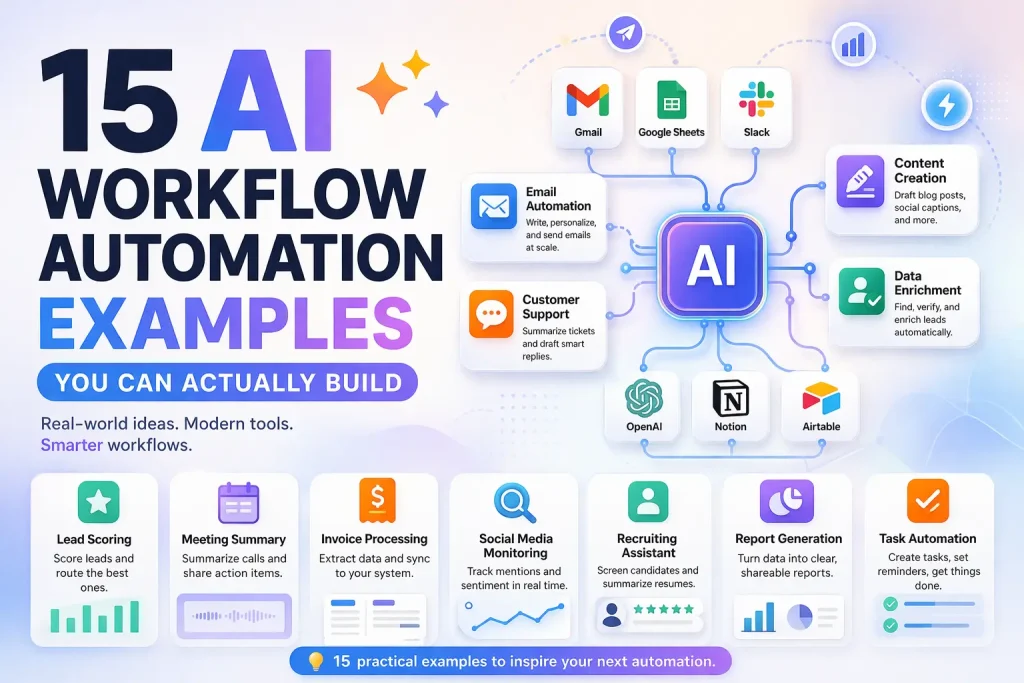
This guide covers concrete AI workflow automation examples that teams can actually implement with tools like n8n, Make, Relay.app, Gumloop, or Pipedream. The goal is to show where AI helps, where standard automation still matters, and which examples are worth building first.
Related Tools




Details
AI workflow automation examples are most useful when they solve narrow, repeatable tasks rather than trying to automate an entire business process in one step. The strongest examples usually combine standard workflow logic such as triggers, routing, approvals, and record updates with one or two AI steps such as classification, summarization, extraction, or drafting.
If you are looking for practical ideas, the best places to start are workflows where teams already move information between forms, inboxes, CRMs, spreadsheets, support tools, or internal docs. In those cases, AI adds value by interpreting messy inputs, while the workflow platform handles the predictable parts that still need to run reliably.
What makes a good AI workflow automation example
A good example has three traits. First, it starts with a clear trigger such as a new form submission, a new support ticket, a row added to a spreadsheet, or a document uploaded to storage. Second, the AI step has a constrained job, such as tagging a ticket, extracting fields from a PDF, or drafting a short summary. Third, the workflow has a measurable output, such as updating a CRM record, notifying a team, or moving an item into the right queue.
Quick examples table
| Example | Best for | Main AI role | Main output |
|---|---|---|---|
| Lead scoring intake | Sales ops | Qualification and summarization | CRM priority updates |
| Support ticket triage | Support teams | Classification and routing | Queue assignment |
| Meeting note follow-up | Internal teams | Summary and action extraction | Tasks and notes |
| Content brief generation | Marketing teams | Drafting and structuring | Brief in docs or Notion |
| Document intake extraction | Operations teams | Field extraction | Structured records |
15 AI workflow automation examples worth considering
1. Lead qualification from form submissions
A new website form submission can trigger a workflow that asks an AI model to summarize the company, infer likely intent, and assign a rough qualification label. The workflow can then create or update a CRM record, alert a sales rep, and send lower-quality leads into a nurture path. This works well when teams receive many incomplete or inconsistent inbound submissions.
2. Support ticket triage and routing
When a new ticket enters Zendesk, Intercom, or a shared inbox, AI can classify the issue type, detect urgency, and suggest a routing label. The workflow platform then applies the rules that decide which queue or owner receives the ticket. This is a better fit than fully autonomous support because the AI only handles interpretation, not final policy decisions.
3. Meeting transcript summaries into project tools
After a call ends, a workflow can pull the transcript, generate a concise summary, extract action items, and create tasks in Asana, Linear, or Notion. This is useful for internal syncs, customer onboarding calls, and sales discovery. The key design choice is whether the AI writes one general summary or separate summaries for each stakeholder group.
4. Sales call recap to CRM
For revenue teams, one of the most practical examples is pushing AI-generated call notes into CRM properties. The workflow can capture next steps, objections, timeline, budget clues, and sentiment markers. That reduces manual note entry, but the important part is still field mapping and validation inside the CRM update step.
5. Research digest generation
A workflow can collect articles, PDFs, or saved links, then use AI to summarize them into a daily or weekly digest for Slack, email, or Notion. This pattern works best when the sources are narrow and the output format is fixed. It breaks down when teams expect the AI to do deep judgment without clear source selection rules.
6. Content brief generation from keyword inputs
SEO and content teams can trigger a workflow from a spreadsheet row or Airtable record, pull supporting SERP or internal research data, and have AI draft a structured brief with angle, outline, and questions to answer. This is faster than starting from a blank page, but it still needs editorial review before it becomes production-ready.
7. PDF and document field extraction
Operations teams often receive invoices, intake forms, vendor docs, or contracts as unstructured files. AI can extract names, totals, dates, IDs, and key clauses into structured fields, after which the workflow can push the result into Google Sheets, Airtable, or an internal database. This is one of the clearest uses of AI inside a broader automation.
8. CRM enrichment and record cleanup
When a new company or contact record appears, a workflow can enrich the entry using APIs and then ask AI to normalize job titles, summarize the account, or detect bad field values. This is useful when the issue is not just missing data, but messy data that needs interpretation before it becomes usable.
9. Inbox classification and follow-up drafting
A shared inbox workflow can label messages by type, summarize long threads, and prepare a first-draft response for a human reviewer. This is especially useful for partnership inquiries, support overflow, or recruiting outreach. The review step matters because outbound email tone and factual accuracy still need human control.
10. Proposal or scope draft generation
Service teams can collect discovery notes, pricing inputs, and project requirements, then use AI to draft a proposal skeleton. The workflow can route the draft into Docs or Notion and notify the owner for edits. This shortens the time between discovery and response, especially for teams with repeatable service packages.
11. Internal knowledge answer assistant
A workflow can take a question from Slack or a form, search approved internal docs, and have AI assemble a short answer with cited source snippets. This is useful for HR, operations, and customer success teams, but only if the retrieval step is reliable and the workflow restricts which sources the model can use.
12. Hiring workflow screening summaries
Recruiting teams can trigger a workflow when a new application arrives, parse the resume, summarize relevant experience, and flag mismatches with role requirements. The workflow can then post the summary to the ATS or hiring manager channel. This can speed up intake, but teams should not use it as an unreviewed final screening decision.
13. Approval assistant for finance or ops
When a request enters an approval queue, AI can summarize the request, identify missing fields, and highlight policy mismatches before the approver reviews it. The automation still depends on deterministic approval logic, but the AI reduces the time spent reading through messy submissions.
14. Data cleanup workflows for spreadsheets and tables
AI can normalize free-text fields, map messy categories to an allowed list, and detect duplicates or inconsistent naming. The workflow platform then writes cleaned values back to the sheet or database. This is a good example of AI handling ambiguity while the surrounding system handles safe record updates.
15. Outbound personalization at controlled scale
A workflow can combine lead data, firmographic context, and a fixed outreach template to produce a first personalized draft. This works when the personalization task is narrow and the workflow enforces guardrails, such as required fields, message length, and approval before sending.
Which examples are best to build first
Start with workflows that already exist in manual form and already have clear input and output systems. Good first choices are support triage, lead qualification, meeting summaries, and document extraction. Those examples usually produce visible time savings without requiring a complete redesign of the surrounding process.
Avoid starting with workflows that require broad judgment across many edge cases, such as full autonomous customer communication or end-to-end operational decision-making. In practice, teams get better results by adding AI to one part of a process rather than handing the entire process to the model.
Common mistakes with AI workflow automation
- Using AI for decisions that should remain rule-based or policy-based.
- Skipping structured outputs and forcing downstream steps to parse messy text.
- Not validating one sample item before scaling the workflow.
- Assuming a template removes the need for field mapping and tool setup.
- Automating a broken manual process instead of simplifying it first.
When a template helps
A prebuilt template is most helpful when the workflow pattern is already common, such as a CRM sync, ticket routing flow, content brief pipeline, or document extraction process. A template can save setup time for triggers, routing, and common integrations. It will not remove the need to adapt field mappings, prompts, approval rules, and tool-specific credentials.
FAQ
What is an AI workflow automation example?
It is a real workflow that combines standard automation steps with one or more AI tasks such as summarizing, classifying, extracting, or drafting content.
Which examples are easiest for beginners?
Support triage, meeting summaries, and lead intake workflows are usually easier because the trigger and output systems are already clear.
Do I need a developer for these examples?
Not always. Many examples can be built in no-code or low-code workflow tools, but API-heavy enrichment or custom logic may still require technical help.
Are templates enough on their own?
No. Templates reduce setup time, but most production workflows still need changes to prompts, fields, authentication, and business rules.
Bottom line
The best AI workflow automation examples do not try to replace the whole process. They improve one high-friction step inside an existing workflow, then hand the result back to reliable automation logic. That is why examples like lead qualification, support routing, meeting follow-up, and document extraction tend to create value faster than broader AI ambitions.
Related Templates

Lead Qualification Slack Workflow Template
This workflow automates lead qualification and keeps the output in sync across the tools used in the process.
View Template
Support Ticket Routing WhatsApp Workflow Template
This workflow automates support ticket routing and keeps the output in sync across the tools used in the process.
View Template
Shopify CRM Sync HubSpot Workflow Template
This workflow automates shopify crm sync and keeps the output in sync across the tools used in the process.
View Template
Research Report Generation Notion Workflow Template
This workflow automates research report generation and keeps the output in sync across the tools used in the process.
View Template
Content Workflow Automation Google Sheets Workflow Template
This workflow automates content workflow automation and keeps the output in sync across the tools used in the process.
View TemplateRelated Guides
How n8n Fits Into an AI Agent Stack
This guide explains how n8n fits into modern AI agent systems, especially when agents need to call tools, run workflows, and interact with business...
Read Guide
n8n for Operations: Where It Fits and What It Automates Best
This guide explains where n8n fits in operations work, what it automates well, and what teams need in place before building production workflows.
Read Guide
Is n8n Worth It? A Practical Review for AI and Automation Teams
This guide evaluates whether n8n is worth it for modern automation and AI workflow teams. It focuses on workflow depth, ownership, deployment flexibility, and...
Read Guide